
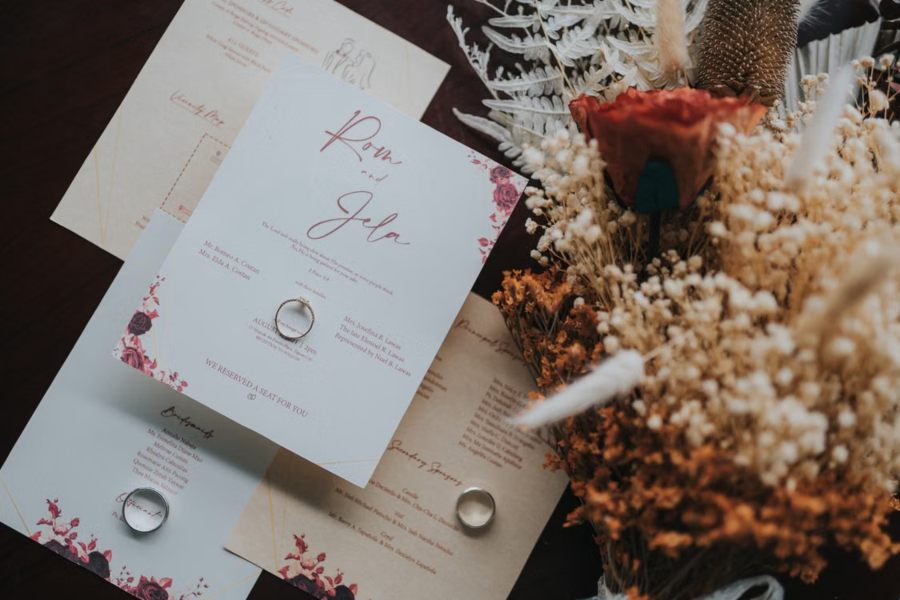
A wedding invitation is often the first real glimpse guests get of the celebration to come — the colors, the tone, the care put into every detail. But paper, no matter how beautifully designed, can only say so much sitting still in an envelope. With image to video technology, that same invitation can carry motion, turning a static design into a small preview of the day itself.
Dreamina, powered by its latest and most advanced video generation model, Seedance 2.5, lets couples animate their invitation design into something guests actually want to watch before they even RSVP.
An invitation sets the tone before the wedding even begins
Long before the ceremony, the invitation is already telling guests what kind of celebration to expect — romantic, modern, rustic, formal. That first impression matters more than couples often realize, and a static design, however elegant, can only communicate tone through color and typography alone. Motion adds a layer that paper simply can’t: a sense of anticipation, built the same way a movie trailer builds excitement before the film begins.
Why couples are moving beyond paper-only invitations
Digital-first communication has changed what guests expect, even for something as traditional as a wedding invite:
- A short video travels further and faster across group chats and social shares than a photo of a card
- Motion gives guests a small emotional preview of the wedding’s overall feel
- An animated invitation doubles easily as save-the-date content or a wedding website centerpiece
Coordinating the animation with the wedding’s overall theme
An animated invitation shouldn’t exist in isolation from the rest of the wedding’s visual identity. Keeping the color palette, motion style, and overall mood consistent with signage, the wedding website, and other printed materials helps the invitation feel like the opening note of a cohesive design story, rather than a standalone effect that doesn’t quite match everything guests see afterward.
Animating your invitation with Dreamina
Step 1: Upload your invitation design and describe the motion
Sign in to Dreamina and open the “AI Video” section. Click “Add reference image” to upload a photo or scan of your invitation, then write a prompt describing the motion you want.
For a 30-second clip, try: Using the floral invitation design from the reference image, generate a 30-second video: watercolor flowers gently blooming and swaying, gold foil lettering softly shimmering as light passes over it, dried flower petals drifting gently across the frame, camera slowly zooming in on the couple’s names in the final seconds.
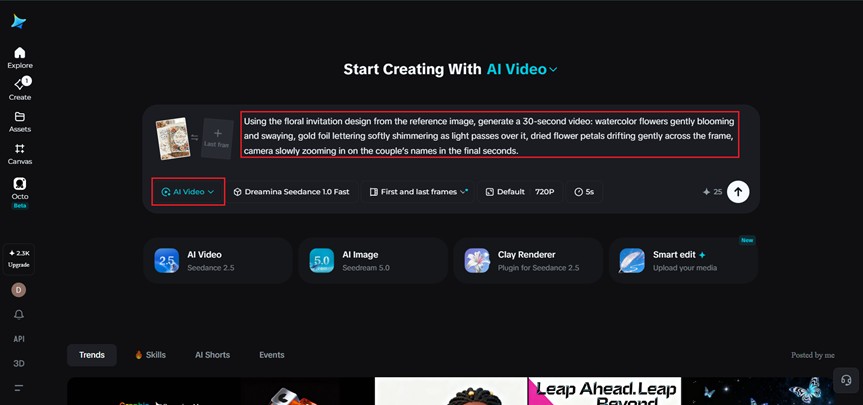
Step 2: Generate the video with Seedance 2.5
Select the Seedance 2.5 model, choose your video length, then pick an aspect ratio suited to how you’ll share it — 9:16 for Instagram Stories or a wedding website hero section, 1:1 for feed posts. Click Dreamina’s generate icon and let the invitation come to life.
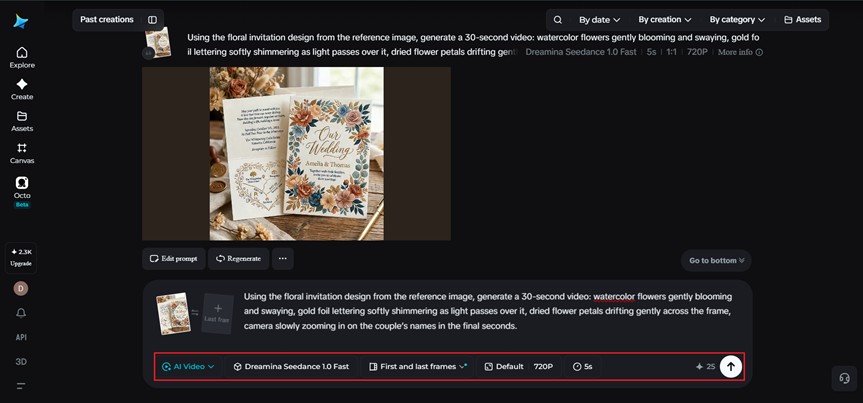
Step 3: Refine and share your animated invitation
Use Dreamina’s editing tools to finish the piece — Upscale for crisper detail on fine lettering and floral linework, Generate soundtrack for soft, romantic background music — then export and share it with guests, or feature it on your wedding website.
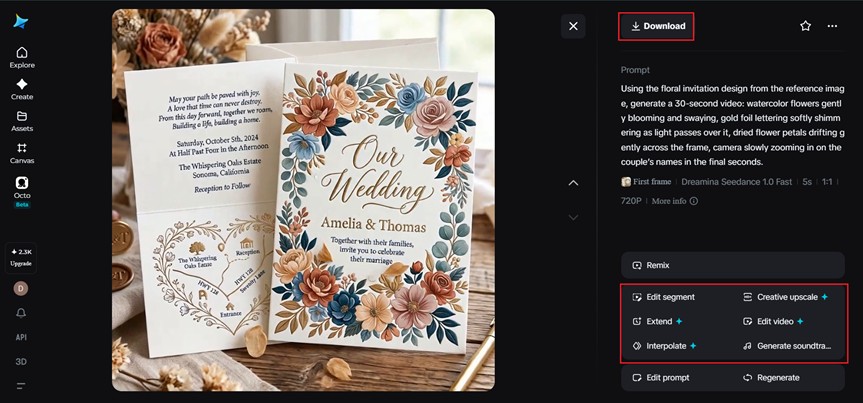
Choosing the right details to animate
Not every element on an invitation needs to move. The strongest results usually come from animating just one or two focal details — a floral illustration, a monogram, foil lettering catching light — rather than setting every element on the page in motion at once, which can feel busy rather than elegant.
Inside Seedance 2.5: handling delicate, decorative detail
Realistic texture over the “AI look”
Wedding invitations often rely on fine details like foil, watercolor texture, or delicate linework, and Seedance 2.5 has significantly reduced the artificial “AI look” in favor of more physically believable light and texture behavior, which matters when the whole point is preserving an elegant, handcrafted feel.
Longer clips for a fuller reveal
Native generation supports clips for up to 30 seconds, with the “Ultra-long Video Generation (beta)” mode extending that range up to 180 seconds — enough time to let a design unfold gradually, from border details to the couple’s names, rather than rushing through it.
Precise local editing
Local editing allows specific elements — a smudge, an unwanted mark, a small design flaw — to be corrected directly within the frame without regenerating the entire animation.
Multilingual support for diverse guest lists
With strong coverage across languages including Spanish, Indonesian, Thai, Arabic, and Japanese, couples with international guest lists can pair their animated invitations with captions in multiple languages without redesigning the card itself.
Matching motion to the invitation’s style
A romantic, floral invitation calls for soft, drifting motion — petals, light, gentle shimmer — while a modern, minimalist design suits cleaner, more restrained movement, like a subtle line animation or gentle fade of typography. Naming that style directly in your prompt helps Seedance 2.5 match the motion to the invitation’s actual aesthetic rather than defaulting to one generic effect.
Using the animated invitation beyond the initial announcement
A single animated invitation rarely has to serve just one purpose. The same clip can open a wedding website, appear in a save-the-date follow-up, or even play as a welcome moment at the reception itself, giving one piece of design work a life that extends well past the original mailing.
Where these animated invitations get the most use
This format works particularly well for wedding websites, digital save-the-dates, social announcement posts, and destination wedding invites, where a moving preview often builds more excitement among guests than a flat photo of a printed card ever could.
Final thought
A wedding invitation was always meant to spark anticipation for what’s coming. With Dreamina and the delicate precision behind Seedance 2.5, that anticipation can finally be felt in motion, giving guests a small, beautiful preview of the celebration before the envelope is even opened.